iOS and Android app development: How cross-platform technologies can help
Key takeaways:
Building iOS and Android apps separately leads to duplicated effort, higher costs, slower releases, and frequent feature parity issues.
Cross-platform approaches reduce these pains by letting teams share logic, architecture, and occasionally even UIs across both platforms.
Web-based and UI-centric frameworks accelerate development but often introduce performance limits, abstraction layers, and plugin overhead.
Kotlin Multiplatform offers a flexible, gradual path to code sharing – delivering native performance, strong tooling, and the option to share anything from small modules to full UIs with Compose Multiplatform.
Choosing the right cross-platform strategy requires evaluating performance needs, team expertise, ecosystem maturity, native API access, long-term maintainability, and the overall cost of ownership.
Building mobile apps for both iOS and Android has always felt like navigating the same sea with two ships, each with its own crew, tools, and rules. Duplicated effort, diverging features, and the burden of parallel codebases are just the tip of the iceberg teams face as apps scale and business demands grow.
Instead of treating iOS and Android as entirely separate, many teams now combine the layers that don’t need to stay distinct. Among Kotlin developers, this ranges from sharing core logic while keeping native UIs with Kotlin Multiplatform, to sharing both logic and UI using Compose Multiplatform across Android, iOS, web, and desktop.
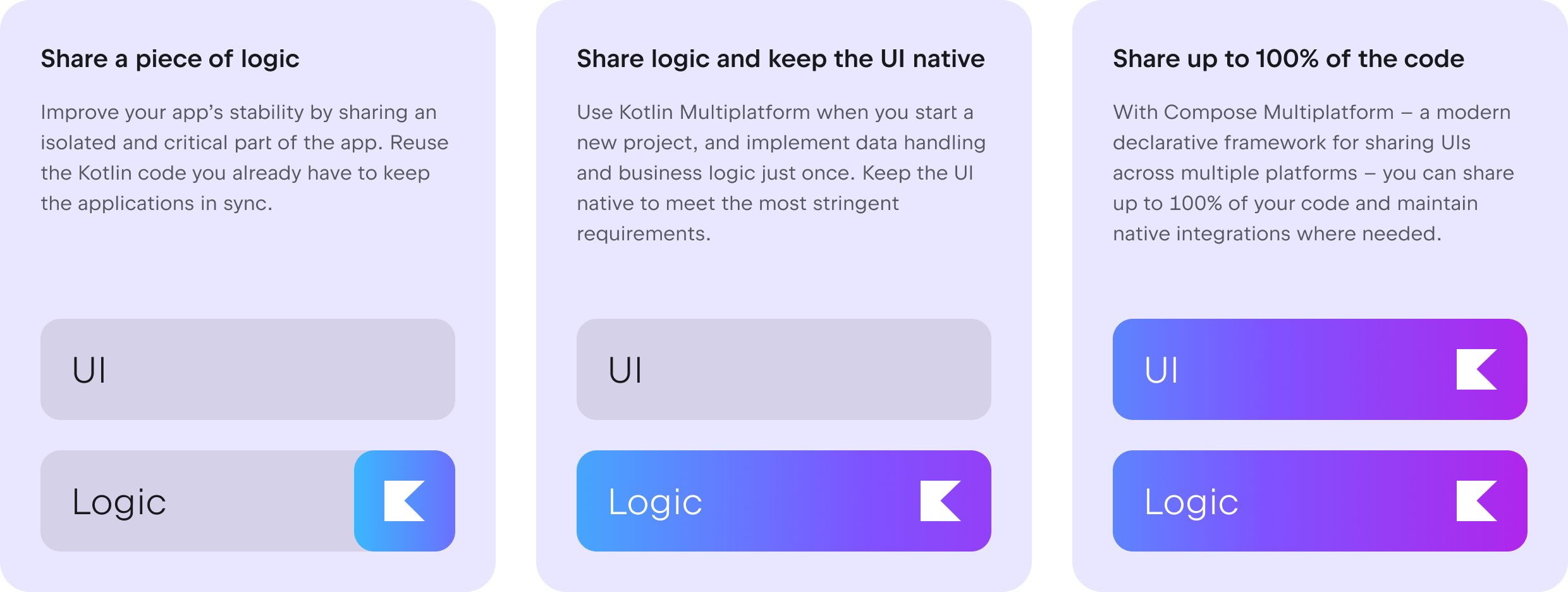
Cross-platform development is no longer a compromise but a strategic choice. Before exploring today’s cross-platform technologies, let’s recap why they’ve become such a game-changer for teams building for both iOS and Android.

11 pains teams face when developing for iOS and Android separately
It doesn’t matter how experienced a team is. When building for Android and iOS at the same time, it’s bound to experience at least a few of these issues:
Double workload, double maintenance – Building everything twice consumes time and energy, transforming basic upgrades into an endless two-track marathon. For example, Perk “spent years re-implementing the same features twice”.
Constant feature parity struggles – One platform moves quickly while the other lags, resulting in a restless product rhythm that ends up annoying both teams and users.
Divergent user experiences – Design decisions may diverge, undermining consistency and giving your brand the appearance of two distinct items.
Higher engineering costs – Having two codebases calls for more engineers, effort, and money, which increases costs without generating added value.
Slower development cycles – Every feature follows the slower platform's pace, lengthening schedules and delaying releases.
Bigger testing burden – QA teams’ effort doubles as they handle device matrices and platform oddities that grow with each iteration.
Double debugging – Teams need to not only build features twice but also debug them twice, and, in the worst-case scenario, fix the same bugs twice.
Knowledge silos across teams – Platform-specific expertise disrupts collaboration, transforming teams into isolated islands of knowledge.
Reduced product velocity – Momentum slows when teams juggle redundant tasks rather than delivering substantial changes like new features or major improvements.
Conflicting platform priorities – Teams run across technical constraints, forcing product compromises that satisfy neither platform fully.
Variation in platform conventions (UI, UX, and navigation) – Android and iOS patterns diverge, demanding unique design paths that negatively impact cohesion and slow down decision-making.
Luckily, when it comes to mitigating these issues, you have several cross-platform technologies to choose from – each with its own benefits but also certain limitations.
Cross-platform development to the rescue
Cross-platform mobile development reduces duplicated work in iOS and Android apps by sharing code across platforms. Different approaches offer different tradeoffs, flexibility, and native integration. For a deeper introduction, see our overview of what cross-platform mobile development is.
Web-based and hybrid solutions
These solutions allow web-focused teams to access existing JavaScript, CSS, and browser tooling, reducing the learning curve and speeding up early work. The ability to reuse code is a significant advantage, as a single codebase can span multiple platforms with minimal duplication. Iteration cycles are typically swift, allowing teams to release updates without app store delays, and UI improvements often require significantly less engineering effort.
However, the performance delivered by such apps generally does not compare to that of native solutions. Complex animations, heavy interactions, and big data flows often feel sluggish on real devices. Accessing native APIs requires bridges or plugins, which bring in a host of issues like fragility, version mismatches, and debugging complexity. Apps built this way often struggle with offline functionality, gesture management, and platform-specific elements.
Over time, constraints in rendering, responsiveness, and native integration can accumulate, leading to a level of technological debt that will be extremely challenging to eliminate.
Cross-platform frameworks
Cross-platform frameworks like React Native and Flutter aim to reduce fragmentation by offering a shared UI layer that runs on both iOS and Android. They help teams improve feature parity, speed up prototyping, and reduce duplicated effort through shared UI logic, hot reload, and rich component libraries supported by large plugin ecosystems.
The tradeoff is an additional abstraction layer on top of native platforms. As OS versions evolve, this layer can introduce new failure points, uneven library quality, and extra complexity when integrating native APIs or performance-critical features. For a closer look at widely used options, see our overview of some of the most popular cross-platform app development frameworks.
Kotlin Multiplatform: Shared code and UIs with Compose Multiplatform
Kotlin Multiplatform is an open-source technology from JetBrains that lets you share code across Android, iOS, desktop, web, and server while retaining the advantages of native development.
KMP is used in production by companies ranging from startups to tech giants like Google, Duolingo, Forbes, Philips, McDonald's, Bolt, H&M, Baidu, Kuaishou, and Bilibili. They have chosen KMP for its adaptability, native performance, ability to deliver native user experiences, and cost-effectiveness, as well as for the ease with which it can be adopted gradually.
What makes Kotlin Multiplatform different from other cross-platform technologies?
It doesn’t require rewriting apps from scratch – You can keep your existing iOS/Android apps and infrastructure rather than rebuilding everything in Kotlin.
It allows incremental adoption – You can adopt Multiplatform for one module, one feature, or one layer at a time.
It works with the skills your devs already have – Your Kotlin devs can build for all platforms using the tools they already know, which means no extra hires and minimal ramp-up. Android developers in particular can be productive from day one, since they’re already experienced in Kotlin.
It’s flexible – You can share discrete modules like networking or storage, and then gradually extend shared code over time. You can also share all of your business logic while keeping the UI native, or progressively convert the UI to Compose Multiplatform without giving up access to native UI components, including complex ones such as video players or maps.
It comes with good tooling – IntelliJ IDEA and Android Studio offer smart IDE support for KMP via the Kotlin Multiplatform IDE plugin, which includes common UI previews, hot reload for Compose Multiplatform, cross-language navigation, refactorings, and tools for debugging across Kotlin and Swift code. Additionally, Junie, the JetBrains AI coding agent, handles KMP tasks so your team can move faster and focus on features.
It delivers native performance – Kotlin Multiplatform uses Kotlin/Native to generate native binaries and access platform APIs directly in situations where virtual machines are undesirable or unavailable, such as on iOS. This allows for near-native performance while creating platform-agnostic code:

Scenarios where Kotlin Multiplatform is particularly helpful
Kotlin Multiplatform can handle a wide range of projects, from MVPs built with Compose Multiplatform to large-scale business applications with complex architectures. Its flexibility allows teams to choose how much code to publish without requiring them to follow an all-or-nothing strategy. This versatility makes KMP an excellent alternative for organizations wishing to consolidate logic while preserving platform-specific layers and ensuring that their UI feels native.
Startups building a new greenfield project
Startups benefit from shared codebases that allow them to save time and resources, especially for MVPs. Kotlin Multiplatform with Compose Multiplatform enables UI and logic sharing, quick prototyping, and the flexibility to mix native and shared UIs, helping teams get their apps into app stores and the hands of their users more quickly.
Small and medium-sized businesses
SMBs can accelerate development by sharing core logic while retaining the option of using native or shared user interfaces, depending on their needs. Kotlin Multiplatform allows gradual adoption, reducing overhead and supporting platform-specific customization.
Enterprises
Enterprises with large, complex apps use Kotlin Multiplatform to ensure consistent business logic across platforms. It successfully coexists with production code, supports incremental integration, and leverages teams’ Kotlin skills, without requiring the use of new tech stacks.
Agencies
Agencies benefit from the ability KMP gives teams to reuse code across platforms, allowing them to meet tight timelines with small teams. It ensures consistent app behavior while accelerating delivery times.
Companies expanding to new platforms
KMP helps companies quickly enter new platforms by reusing existing codebases while maintaining native performance and UI flexibility. This approach balances speed with platform-specific experiences.
Teams developing SDKs
KMP compiles shared Kotlin code into platform-specific binaries, integrating seamlessly with native projects. It supports platform APIs and offers flexibility between native and cross-platform UIs, making it ideal for SDK development. Platform teams can use their respective languages (e.g. Swift) to conveniently interface with Kotlin Multiplatform libraries.
How to choose the right cross-platform technology for your iOS and Android project
Identify your primary requirements
Start by mapping out the core of your product. Does it require buttery-smooth animations, hardware-level functionality, or near-instant performance?
By defining these requirements early on, you build a compass for choosing technologies that naturally support the experience you want to deliver – so you avoid frameworks that would require cumbersome workarounds later.
Consider your team's current competencies
A framework is only as effective as the team using it. If your engineers are highly invested in specific technologies, selecting a product that complements their abilities keeps morale high and makes onboarding quick. For example, if your team already has strong Kotlin expertise, adopting Kotlin Multiplatform lets them leverage existing skills across platforms, reducing friction and accelerating delivery.
Forcing the team into an unknown area, on the other hand, might slow down progress, cause tension, and lead to technical errors. Aligning the solution with current skill sets preserves momentum and reduces time-to-impact.
Evaluate the ecosystem
Every framework relies on its environment to function. High-quality libraries reduce the need to recreate core components. Frequent updates, particularly those timed to coincide with OS upgrades, indicate a robust and viable project.
Assessing these criteria prevents you from selecting a solution that will stagnate or collapse under the weight of future demands. For example, Flutter developers benefit from the rich ecosystem on pub.dev, while Kotlin teams can tap into shared libraries on klibs.io.
Mobile apps are rarely standalone; they rely on analytics tools, payment providers, authentication SDKs, and device features. Check that the framework you're considering has reliable, well-maintained plugins for the services you require. Poor support in certain areas results in issues like workarounds, brittle integrations, or a need to write new native modules, thereby reducing the benefits of cross-platform programming.
Evaluate interaction with native APIs
Not all frameworks communicate with native APIs equally well. Some offer deep, well-documented bridges that expose low-level functionality in a clean and safe manner. Others rely significantly on third-party plugins or require new native modules, which adds complexity. Understanding how seamless, reliable, and adaptable these integration paths are is essential. This is how you make sure that future features aren’t constrained by the framework's restrictions.
Kotlin Multiplatform, for instance, allows teams to share logic across platforms without sacrificing native performance. It also allows seamless access to the entire breadth of the available device SDKs directly from Kotlin, without requiring you to write any adapters or bridging functions.
Check performance benchmarks
Examine benchmark data thoroughly, particularly for cold-start times, UI responsiveness under stress, and overall memory consumption. Some frameworks excel for creating simple interfaces but struggle to handle animations, gestures, or large datasets. Testing real performance metrics helps you prevent surprises when your app meets real devices and high-traffic circumstances.
For example, comparing the performance of Compose Multiplatform 1.8.0 for iOS with a native iOS app, we saw that:
The startup time was comparable to native apps, so the first frame arrived just as quickly on both platforms.
Scrolling performance was on par with SwiftUI, even on high-refresh-rate devices.
Compose Multiplatform added only ~9 MB to the size of an iOS app compared to a fully native SwiftUI app with the same UI logic and assets.
Learning curve
Evaluate the volume and quality of available learning resources about a framework. For example, Kotlin Multiplatform developers can use a rich library of educational materials – here’s an overview.
Assess the cost of ownership
Aside from initial development, every framework comes with hidden costs. Talent availability influences hiring delays and salaries. Custom plugins may need to be built and maintained in underdeveloped libraries.
Migrating away from a selected framework can be challenging, especially if architectural decisions bind your app to its internals. Assessing the overall lifetime cost enables you to make a financially sound choice that will endure over time.
Review real-world case studies
Case studies demonstrate how frameworks operate under real-world pressures like scaling issues, performance bottlenecks, team procedures, and unanticipated limitations. Teams that develop apps similar to yours provide relevant insights, so case studies can shed light on obscure areas that technical documentation alone may not reveal. They also help you understand how well a technology scales for complex applications with a large number of users and developers.
A good example comes from Duolingo, which ships weekly on iOS and Android to more than 40 million daily active users across 176 countries. Duolingo developers have shared their experience using Kotlin Multiplatform, explaining how KMP helped them ship faster at scale:
If you’d like to see the full story, you can watch the case study video.

Consider the supporting organization to ensure longevity
The long-term health of a framework reflects the stability of the organization that supports it. Strong backing typically entails ongoing investment, frequent revisions, and alignment with industry trends.
A prospective framework’s roadmap provides a preview of where the framework is headed – and whether that path is consistent with the evolution of your project. Selecting a tool with a long-term future prevents your staff from relying on outdated technology.
Conclusion
Building for iOS and Android no longer has to feel like juggling two separate worlds. Modern cross-platform solutions let teams collaborate, focus, and move faster while maintaining native quality. Whether you're sharing a piece of functionality or sharing all the code, these tools provide various techniques to match distinct product realities and team capabilities.
As we move toward a world where multiplatform development is the norm rather than the exception, the question isn't whether to share code across iOS and Android, but how you can share it without jeopardizing your product vision.
With a careful examination of needs, team capabilities, performance expectations, and long-term maintainability, you can select a solution that amplifies your strengths while allowing your teams to focus on what is actually important: providing an outstanding experience on every device your users own.
If you’re ready to accelerate your delivery, reduce duplication, and modernize your mobile architecture, now is the perfect moment to explore Kotlin Multiplatform and the benefits it can unlock for your team.